🛠️ What is new in MED v2
MED v2 is the TAC MED with bigger limits, autosave, crash files, Import Binary Mission and a stack of crash fixes. Everything it adds, in one place.
Bigger limits
| Before (Biggy's bigger-limits MED) | MED v2 | |
|---|---|---|
| Objects | 16,192 | 49,152 |
| Tiles | 12,288 | 32,000 |
| Events | 256 | 1,024 |
| Waypoint lists | 128 | up to 250 |
It also reads the TAC game files past 2 GB (after the September TAC update the old MED could not).
The game itself only has room for 128 waypoint lists. MED v2 saves lists 128 and up in an extra block at the end of the .bms that a normal server ignores; only a server patched to read that block uses them. Ask in TAC Mappers HQ before building a map that needs more than 122 lists (123-127 are reserved by the game).
Since TEST12, every event picker (the Event Number list in Event Trigger, and the event list in actions like Reset Event) lists all 1,024 events. Before TEST12 they stopped at event 255, and opening a trigger on an event above 255 showed event 0; pressing OK saved it as event 0. If you edited such a trigger with an older MED, check it still points at the right event. The game itself always handled event numbers above 255.
Autosave
Every 5 minutes MED saves a copy of each page that has objects, next to your map:
YourMap_autosave1.mis/.til(newest)YourMap_autosave2.mis/.tilYourMap_autosave3.mis/.til(oldest)
Your own map file is never touched: MED still asks you to save as normal. A map you have never saved goes next to JOTACmed as MED_untitled_page1_autosave1.mis. Switch it on or off with File › Autosave every 5 minutes; MED remembers your choice.
If MED crashes
- It writes a crash file next to the exe,
MED_crash_<date>_<time>.dmp. Post it in #sysdumps in TAC Mappers HQ: it shows exactly where MED died. - It tries an emergency save of your map,
YourMap_crash.mis/.til(it may be incomplete; your autosave copies are next to it too). - A box tells you where both files are, then MED closes.
To recover: open the _crash.mis (or an _autosave), check it, then Save As your map's name.
Import Binary Mission
File › Import Binary Mission (.bms)... turns a .bms back into an editable map: <name>_imported.mis (and .til) next to the .bms, opened straight away.
- Everything the game uses comes back: every object with its settings, events with their triggers and actions, waypoint lists, groups, area triggers, bounding boxes, weapons, weather, terrain and tiles (from the
.tilnext to the.bms). - What a
.bmsnever stored cannot come back: event names (they become Event 0, Event 1 ...), group names, waypoint list names and object labels. - A
.bmsexported by MED v2 carries the whole map inside it (about +100 KB), so it comes back exactly: names, colours, layers, everything. The game never reads that part, so the map plays exactly as before. - Heights come out right: a
.bmsstores heights above sea level, a.misstores height above the ground, and the import converts between them using the terrain.
Tested on 21 original NovaLogic maps: every object, event, waypoint list, area trigger, bounding box and tile came back identical.
Import Nile Project
File › Import Nile Project (.npj / .npz)... turns a Nile project into a MED map: <name>_imported.mis next to the project, opened straight away. Place things in Nile's 3D view, then do the finishing touches in MED.
- Comes across: every object with its rotation, team, AI file and settings, groups, waypoint lists, map tiles, terrain, water, fog distance and time of day.
- Heights come out where the game puts them. Nile's height is the height above the ground, except objects ticked Absolute, which keep their real height. On top of that, when the game loads a Nile project it moves many models by a small amount built into the model itself (its "ground point": stairs 6.4 m down, some trees 5 m up, sandbags 1 m). The old NovaHQ converter missed that, which is why buildings floated or sank. MED does the same as the game.
- Not copied, because a
.mishas nowhere to put it: Nile's event script (keep shipping the map's.wac, or redo the events in MED). The fog colour is copied but left switched off: tick Fog Color in General Information to use it. - A map with more than 255 vehicles imports fine. Export Binary Mission then warns that the vehicles exceed the maximum: click OK, every vehicle is still exported.
Tested on the stock Nile map Tanah Highlands (ASP_G7): imported, exported from MED and played in Joint Ops, all 1,193 buildings sat within 5 cm of where the game puts them when it loads the Nile project itself. All 42 Nile maps we have import, including the TAC ones and Cm's CentralVillage.
Solid 3D view and cut-away
The 3D Wireframe view draws every edge of every model at once, which turns a building into a tangle of lines. Select an object and click Solid 3D (next to 3D Wireframe): every surface is filled in and shaded by the way it faces, with dark outlines on the edges, and nearer surfaces hide the ones behind. No textures: the selected object is yellow, the rest grey, as before.
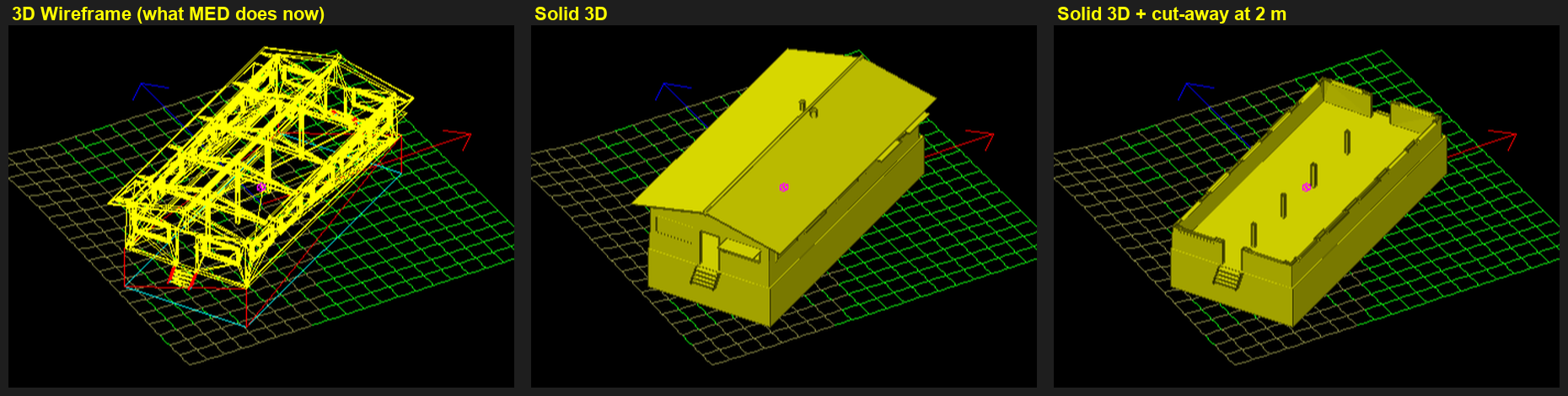
MED's 3D view always looks at the selection from outside (there is no camera you can walk inside with), so to see in, you slice the top off:
- V switches between solid and wireframe.
- H turns the cut-away on or off. It hides everything higher than 2 m above the selected object.
- PgUp / PgDn move the cut 0.5 m (hold Shift for 2 m): one floor at a time in multi-level buildings.
- Rotating, zooming and every other 3D view key work as before. The yellow line at the top left of the view says which mode is on.
Night Mission and Start with NVG
Two boxes in Edit › General Information, checked against the game's own code:
- Night Mission (sounds + AI) (called Night Vision Goggles Available before TEST15) does not control NVGs: players can always use them. The game only reads it as "this is a night mission": soldiers use their night death sounds and the AI gets a small change.
- Start with NVG Turned On works: players spawn with NVGs on. Since TEST15 it can be ticked without the first box.
- Turning NVGs off for players can't be done from the map: NVGs run on each player's own PC, so it needs a client DLL change.
Group 1 is every player
The game puts every human player in group 1, whatever their team, and never puts anyone in group 2. The old default names "Blue Players" / "Red Players" made that look like teams; since TEST15 new maps call them All Players and Group 2 (maps with names keep them). So a Group 1 Is Within Area trigger fires for a player of either team.
For one team only, count each team in the area with the map's WAC and trigger on a Mission Variable:
set(V10, 0)
set(V11, 0)
GLOOP G_blueplayers
  IF SSNarea(player, 17) THEN inc(V10) END
END
GLOOP G_redplayers
  IF SSNarea(player, 17) THEN inc(V11) END
END
V10 = living Blue players in area 17 right now, V11 = Red. In MED, use the trigger Mission Variable 10 with > 0 (MED's variable numbers are the WAC's V numbers). Area 17 = the area's number in MED. See WAC basics. Not yet run in a live match.
Map Colours
General Information › Map Colours: the map's own fog, horizon, sun, sky, ground and lightning colours. Full guide: Map Colours in MED.
Fixes
- Tiler tab: placing a tile no longer crashes MED (the Tiler's hidden scratch copy of the map was too small since the bigger-limits MED).
- Big screens (1440p, 4K): tabs that would not switch, "save this mission?" with no changes, and wrong drawing below row 1024 are fixed.
- Opening a map with a vehicle that has no vehicle settings (Elk's jet ski) no longer crashes MED.
- Mouse-wheel zoom no longer freezes MED: each notch zooms like one +/- key press.
- Bounding boxes exported with the wrong type (they did not work in game) since the bigger-limits MED: fixed.
- Picking the geox terrain says which file is missing instead of crashing; "can't find .tga" after changing terrain is fixed.
- Deleting an event no longer re-points other events' "Reset Event" actions at the wrong event.
- No more false "READ-ONLY" warning when saving to a new file name.