🚫 Bans tab
Keep the trolls out. WolfRAT's own ban list - by name, by IP or by a whole range - removes anyone on it the moment they show up, and can spot VPNs and proxies before they cause trouble.
Why WolfRAT has its own ban list
Joint Ops has a ban command of its own, but it bans by a CD-key number - and nobody has a CD key any more, so it bans nobody. Every other admin tool for these games does the same thing instead: keep a list of names and IP addresses and kick a match the instant they appear. From WolfRAT 2.6.8 that list lives on the Bans tab, and the Ban button on the Players tab and a moderator's !ban both add to it.
The one thing you need for IPs
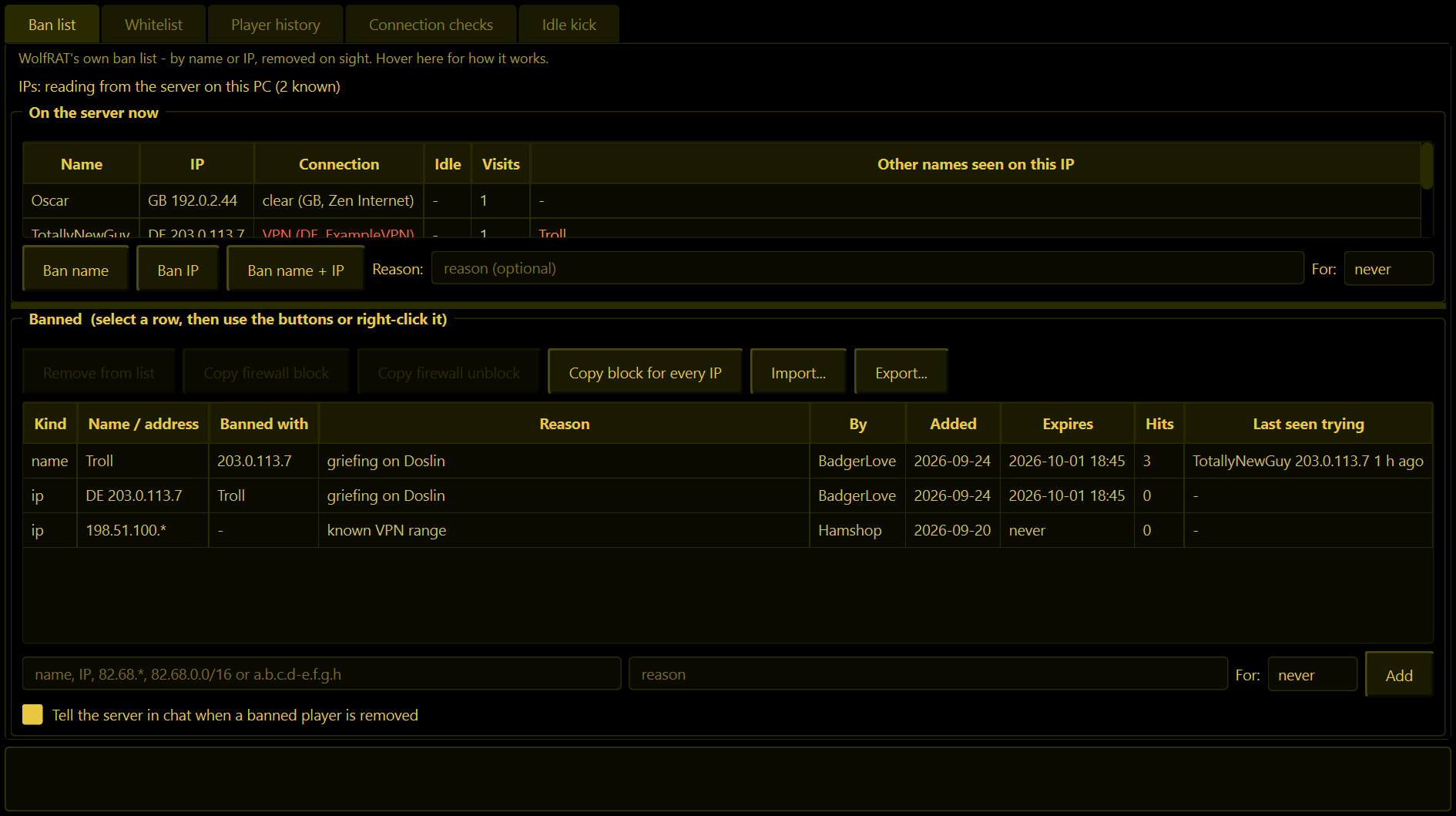
WolfRAT has to be running on the same PC as the game server. The server never tells anyone a player's IP, so WolfRAT reads it straight from the running game - the same way the Weather tab works. The line near the top of the Ban list page tells you where you stand: "IPs: reading from the server on this PC" means you have them. If WolfRAT is on a different machine, bans by name still work; only the IP side is missing.
Ban list page
On the server now
Everyone currently on, with their IP, how many times they have visited, and - in orange - any other names seen on that same IP. That last column is the rejoin detector: someone you banned as "Troll" who comes back as "TotallyNewGuy" from the same address shows "Troll" right there.
Select a player, type a reason if you like, pick how long for, and press one of:
| Button | What it does |
|---|---|
| Ban name | Adds their name. Catches them however they connect, until they change their name. |
| Ban IP | Adds their address. Catches them whatever they call themselves, until they change their address. |
| Ban name + IP | Both. This is the one to use. The two entries know about each other - the Banned with column shows the pairing. |
They are kicked straight away, and the server is told "(name) removed - banned: (reason)" if the tick box at the bottom of the page is on.
Banned
The list itself. Every entry shows what kind it is (name or IP), what it was banned with, the reason, who added it, when, when it expires, how many times it has caught somebody (Hits) and who it last caught, with their address and when.
Adding by hand: type into the box under the table and press Add. It takes a name, an address, or a range in any of these shapes:
| You type | It bans |
|---|---|
Troll | That exact name (capitals do not matter). FMJ-* bans every name starting "FMJ-". |
82.68.58.92 | That one address. |
82.68.* | Every address starting 82.68. - the Babstats style. 82.68.58.* and 82.* work too. |
82.68.0.0/16 | The same range written the network way. |
82.68.58.1-82.68.58.99 | Everything from the first address to the second. |
For: never, or 1 hour, 1 day, 7 days, 30 days or 90 days. An expired entry drops off the list by itself.
The buttons above the table work on the selected row (or right-click the row):
| Button | What it does |
|---|---|
| Remove from list | Unbans. They can rejoin on the next map change or reconnect. |
| Copy firewall block | See below. |
| Copy firewall unblock | Lifts a block you pasted earlier. |
| Copy block for every IP | One line per IP entry, all at once - handy after importing a big list. |
| Import... | Paste a list in. See "Moving your old ban list over". |
| Export... | Writes the list to a text file another WolfRAT can import. |
Firewall block - the copy-paste that keeps them out completely
A ban kicks people within about 5 seconds of joining. That is usually enough, but someone determined can pop in, type one line and get kicked, again and again. The firewall stops them ever reaching the game.
- Select the IP entry and press Copy firewall block.
- On the PC that hosts the server, open PowerShell as administrator (right-click the Start button).
- Paste and press Enter. It says Blocked 82.68.58.92.
The line blocks all game traffic from that address (and only that address) and nothing else on your PC. Copy firewall unblock gives you the matching line to remove it. WolfRAT never touches the firewall itself, so it does not need to run as administrator.
Ranges work too: 82.68.* becomes one rule covering the whole range.
Moving your old ban list over
Press Import... and paste. One entry per line, in any of these shapes:
82.68.58.92
82.68.* | whole range
Troll | griefing | 7d
Someone | | 2026-12-31
That is value, then optionally | reason, then optionally | expiry (never, 7d, 12h, 30m, or a date). Commas or tabs work instead of the bar. Blank lines and lines starting #, // or ; are ignored, and so are [section] headers, so a Babstats BannedIps.ini pastes in as it is (its address=reason lines are understood). Lines from Joint Ops' own banlist.txt are read for the name.
The box underneath shows exactly what will be added and what is being skipped and why, before anything changes. Got a list in some other shape? Paste it and this paragraph into any AI assistant and ask for it in the shape above.
Whitelist page
Names and addresses here are never removed, whatever else matches - even if you ban a whole range that covers them. Put your admins and regulars here before adding wide ranges, and anyone who genuinely plays through a VPN if you use the connection checks.
Player history page
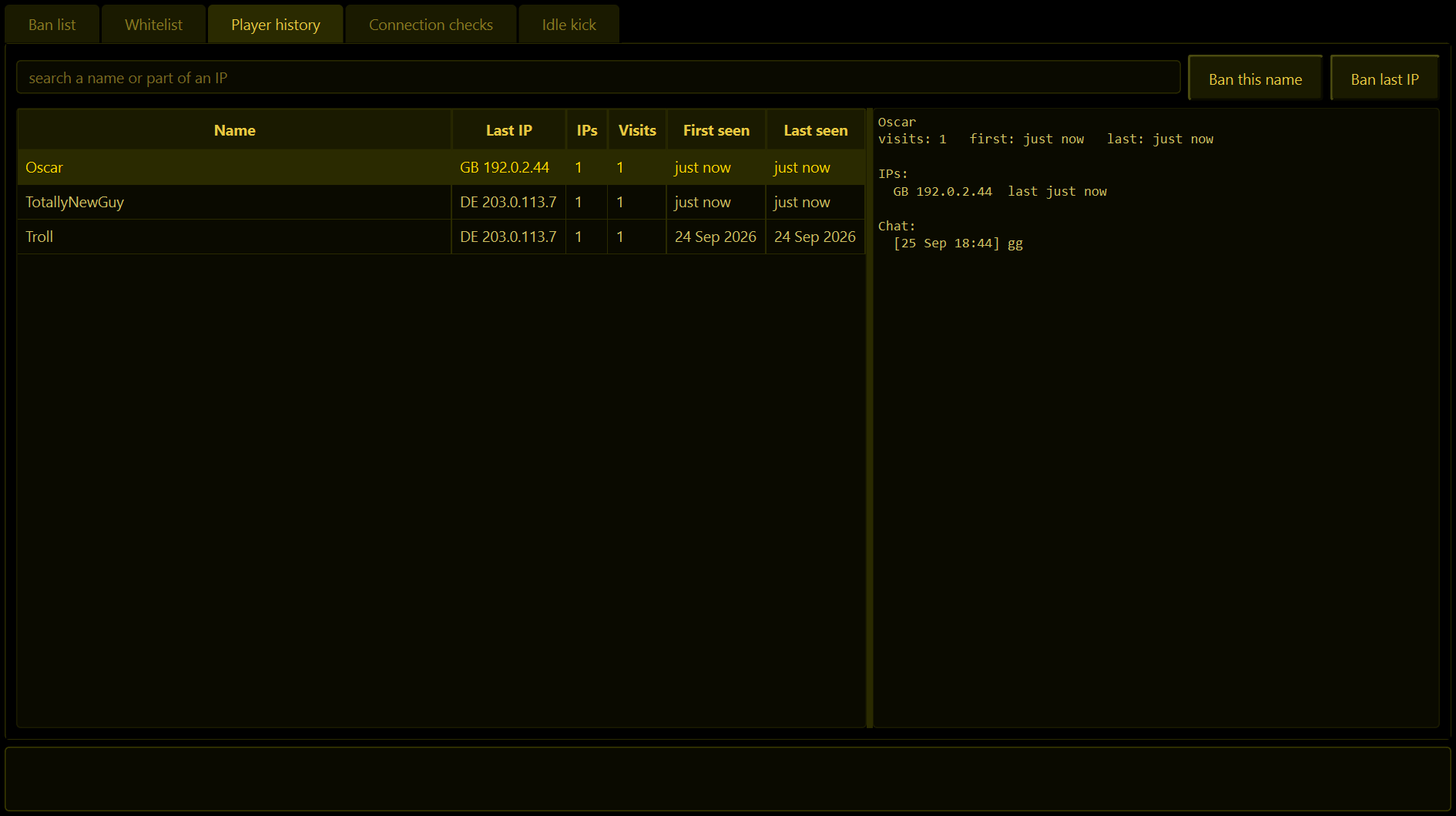
Everyone who has ever been on: name, last IP, how many different IPs, visits, first and last seen. Type part of a name or an address in the search box to narrow it. Select a row and the right-hand pane shows every IP they used - with any other names seen on each - and their last 200 lines of chat. It is what you read before deciding a ban. Two buttons ban the selected person's name or last IP straight from here.
Connection checks page
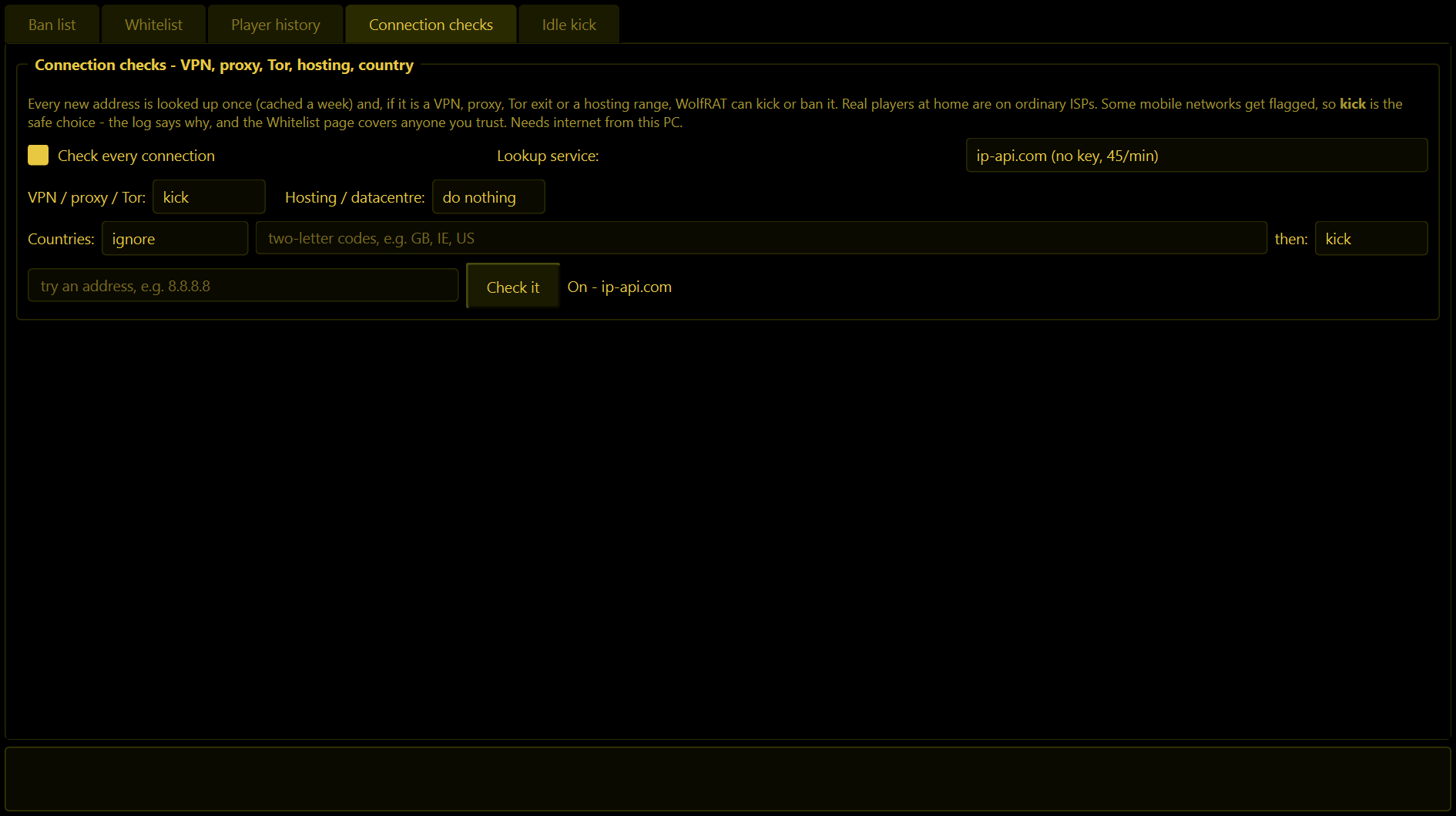
A banned troll's usual next move is a VPN, which gives them a new address. This page looks every new address up and tells you - or acts - when it is not an ordinary home connection.
Off unless you tick "Check every connection". When it is on, each new address is looked up once and the answer kept for a week, so your regulars cost nothing. The lookup service is ip-api.com (no sign-up, 45 lookups a minute - far more than a game server ever needs) or proxycheck.io, which gives better VPN detection with a free key.
| Setting | What it does |
|---|---|
| VPN / proxy / Tor | What to do when the address is a VPN, proxy or Tor exit: do nothing, kick, or ban. Kick to begin with. |
| Hosting / datacentre | Same choice for addresses that belong to a hosting company rather than an internet provider. Do nothing to begin with. |
| Countries | Ignore, block the countries you list, or allow only the countries you list - two-letter codes such as GB, IE, US - and what to do about a match. |
| Check it | Type any address and see its verdict in the log, to try the service out. |
The Connection column in "On the server now" shows each player's verdict - clear (GB, Zen Internet) in the normal colour, a VPN or a blocked country in red - and once an address has been looked up its country letters appear in front of the IP everywhere on the tab. The where-from line on the Messages tab (2.8.3) reads these same answers, so it never costs an extra lookup.
Some mobile networks and shared connections get flagged as proxies. That is why kick, not ban, is the starting setting: the log says exactly why someone was removed, and the Whitelist page fixes it in one line. A lookup that fails (no internet, service busy) never removes anybody.
Idle kick page (2.6.9)
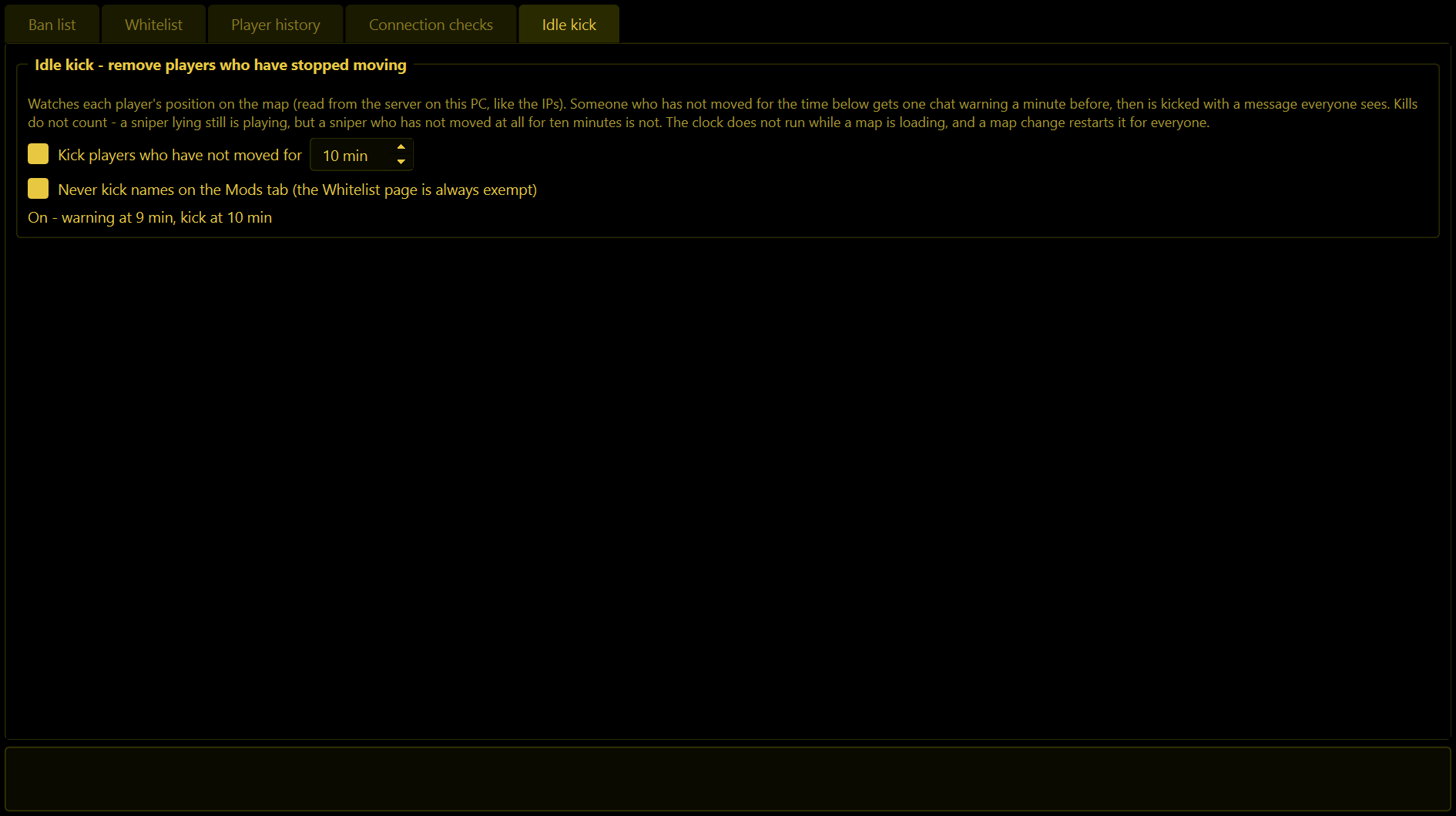
Somebody who joins and then sits in a bush for half an hour is taking a slot from a real player. WolfRAT watches each player's position on the map (read from the server on this PC, like the IPs); kills do not count, because a sniper lying still is playing, but a sniper who has not moved at all for ten minutes is not.
| Setting | What it does |
|---|---|
| Kick players who have not moved for | Off unless you tick it. 10 minutes to begin with. A minute before the limit the player gets two lines in chat - "(name): you have not moved for 9 min" and "Move now or you will be kicked in 60 seconds" - then they are kicked and everyone sees "(name) kicked - idle 10 min". |
| Never kick names on the Mods tab | Ticked to begin with. Your moderators and admins are left alone; the Whitelist page is always left alone whatever this says. |
The Idle column in "On the server now" shows how long since each player last moved, even with the kick switched off, and turns red in the last minute. The clock does not run while a map is loading, and a map change restarts it for everyone. With the server on another machine there is no position to read, so nothing ever happens.
In-game commands
For moderators whose rank includes ban:
| Command | What it does |
|---|---|
!ban player reason | Adds the player's name and IP to the list and kicks them. The reason is optional and goes on the entry. |
!unban name or !unban address | Takes that name or address off the list. |
Where it is kept
Three files next to WolfRAT2.exe: wolfrat_bans.json (the list and the whitelist), wolfrat_player_history.json and wolfrat_ip_checks.json (the settings and the week's lookups). Copy them to move everything to another PC.