🌦️ Weather / Wildlife
Change the sky on your server, live. Rain, storms, snow, fog, wind, lightning and even earthquakes - and every player sees it with the normal game. No download for players, no server patch, no restart. The Sky page recolours the sky (needs the sky-colour patch), and the Wildlife page makes the TAC mod's sharks hunt.
The one thing you need first
WolfRAT has to be running on the same PC as the game server. The weather works by changing numbers inside the running server, and that can only be done from the same machine. If you connect to a server somewhere else, the Weather tab stays greyed out - everything else in WolfRAT still works.
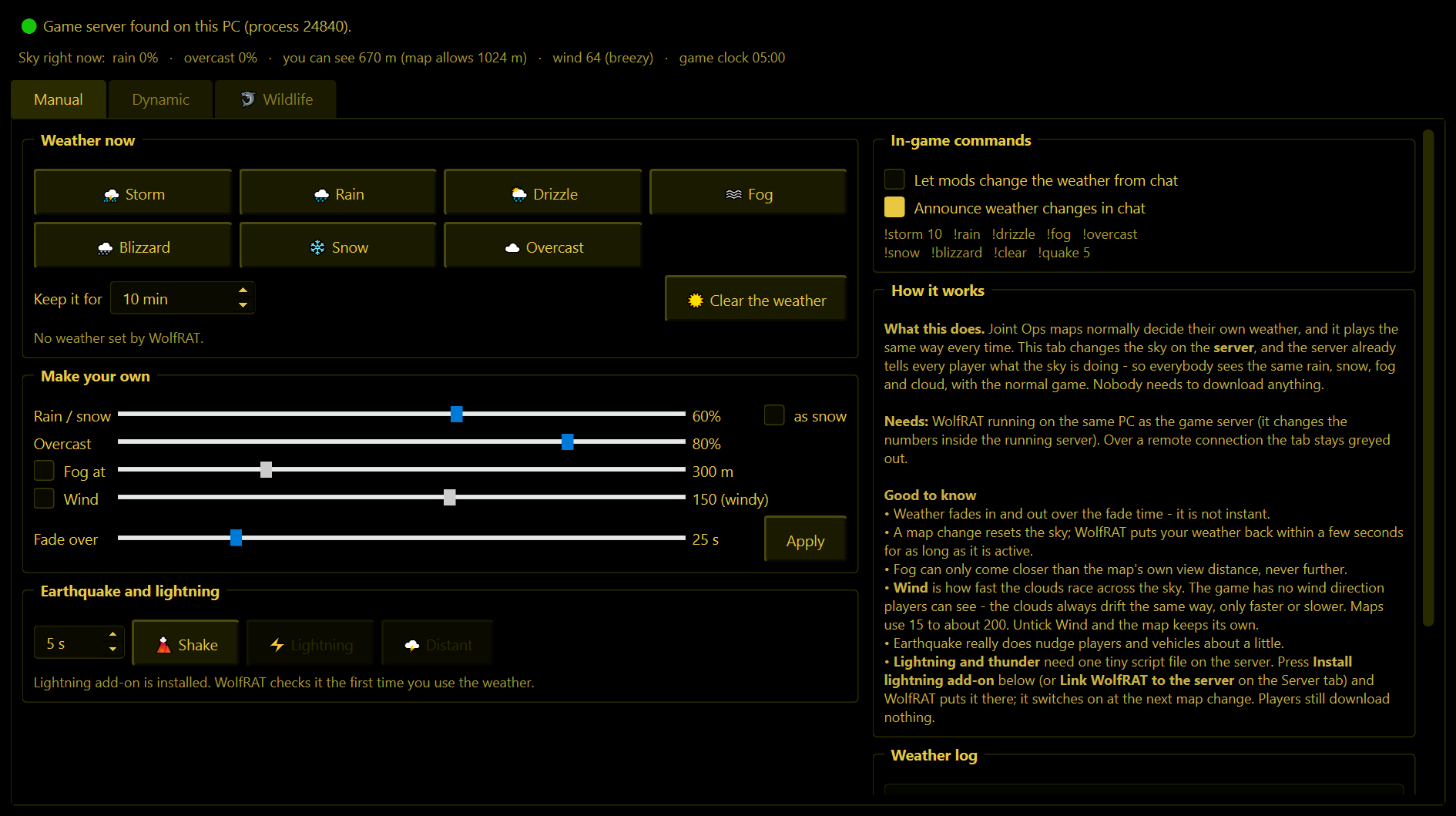
The line at the top of the tab tells you where you stand. Green dot and "Game server found on this PC" means you are good to go. Underneath it, "Sky right now" shows what the server's weather is actually doing at this moment.
Manual page - weather on demand
Weather now
One click each: Storm, Rain, Drizzle, Fog, Blizzard, Snow, Overcast. The weather fades in over about half a minute, the same way the game does it - it does not just snap on.
- Keep it for - how many minutes the weather stays. When the time is up WolfRAT clears it for you. Set it to the lowest value and it reads "until I clear it".
- Clear the weather - hands the sky back to the map. You get the map's own weather back, exactly as it was, not just a blank blue sky.
A map change resets the sky. If your weather still has time left, WolfRAT puts it back a few seconds after the new map has loaded.
Make your own
Sliders for Rain / snow amount, Overcast (how dark the cloud is), Fog at (how far players can see, in metres) and Fade over (how many seconds the change takes). Tick as snow to get snow instead of rain, then press Apply.
Fog can only come closer than the map's own view distance, never further. If a map already limits the view to 400 m, asking for 800 m does nothing.
Wind (2.8.1)
Tick Wind and use its slider (0 to 255) - the number is shown with a word next to it: still, light, breezy, windy or gale. In Joint Ops, wind is how fast the clouds race across the sky; the game has no wind direction it can show players, so there is nothing to set for that. The Storm and Blizzard buttons now bring strong wind with them. When WolfRAT's weather clears, the map gets its own wind back - some maps, like Villa Valley TAC, already have plenty.
Earthquake and lightning
- Shake - an earthquake for the number of seconds you choose. It really does nudge players and vehicles about a little, so use it for fun, not mid-firefight.
- Lightning - a flash overhead with a crack of thunder. Distant - a far-off flash and rumble.
The lightning add-on
Lightning needs one tiny script file in your server folder. You do not have to make it: press Install lightning add-on and WolfRAT puts it there for you. It switches on at the next map change (the game only reads its scripts when a map loads). The sentence under the buttons always tells you which state you are in: needs the add-on, installed and waiting for a map change, or ready.
The add-on is safe to leave in place forever - it does nothing at all unless WolfRAT asks it to. Players download nothing. If you already have your own server.wac, WolfRAT adds to it and leaves your lines alone.
In-game commands
- Let mods change the weather from chat - off by default. Tick it and the people on your Mods list can use the weather commands below.
- Announce weather changes in chat - WolfRAT tells the server when weather is on its way.
| A mod types | What happens |
|---|---|
!storm 10 | Storm for ten minutes. The number is optional on all of these - leave it off and the weather lasts the Keep it for time set on the Manual page (10 minutes if that says "until I clear it"), then clears itself. |
!rain !drizzle !snow !blizzard !fog !overcast | The other skies. |
!clear | A dry sky - no rain, even on a map built rainy - for the minutes given (or the Keep it for time), then the map's own weather comes back. |
!quake 5 | Earthquake, 1 to 40 seconds. |
!lightning | A flash and thunder (needs the lightning add-on). |
!lightning red | A coloured flash: red, orange, yellow, green, cyan, blue, purple, pink, white, blood or a colour like #ff00ff. Add far for a distant one. Needs the lightning add-on and the sky-colour patch. |
!weather on | Switches the changing weather on. Add how often: !weather on rare, normal, frequent, always, or !weather on custom 5 20 for a front every 5 to 20 minutes. |
!weather off | Switches the changing weather off. The sky goes back to the map's own. |
!weather status | Says whether it is on, and how often. |
Dynamic page - weather that changes on its own
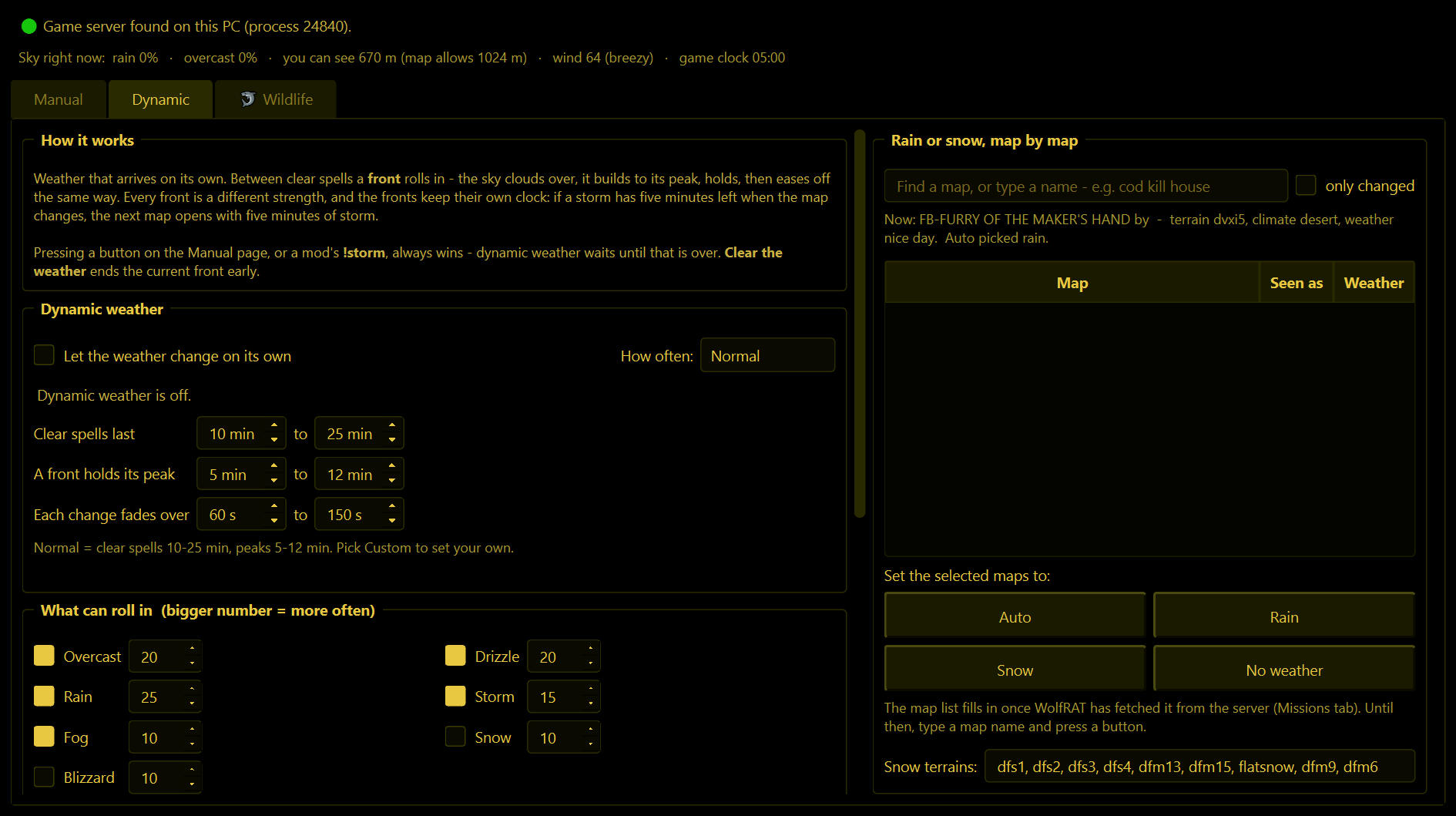
Tick Let the weather change on its own and the server gets real weather: a clear spell, then a front rolls in - the sky clouds over, it builds to its peak, holds, then eases off again - then another clear spell. Every front is a different strength and length, so no two rounds feel the same.
How often
| Setting | Clear sky between fronts |
|---|---|
| Rare | 25 to 60 minutes |
| Normal | 10 to 25 minutes |
| Frequent | 4 to 10 minutes |
| Almost always | 1 to 2 minutes |
| Custom | You set the minutes yourself in the boxes underneath. |
What can roll in
Tick the kinds of weather you want and give each a number - a bigger number means it turns up more often. The line underneath works it out for you in plain terms ("out of 100 fronts: rain 28, storm 17..."). You can also set how thick the fog may get, let storms flash with lightning at their peak, and allow the odd rare earthquake (off by default).
Fronts bring wind (2.8.1) - on by default. Each front picks its own wind between the two numbers you set (60 to 220 to begin with): storms and blizzards blow hardest, rain and snow less, and fog comes with still air.
Rain or snow, map by map
On Auto, WolfRAT looks at the map that is loaded and decides for itself: snow maps get snow and blizzards, everything else gets rain and storms. You will see its reasoning in the "Now:" line. If it gets one wrong, select the map in the list and press Rain, Snow or No weather to take over. Auto hands the decision back.
- The map list fills in once WolfRAT has fetched your maps (Missions tab). Until then you can type a map name and press a button - close spellings are understood.
- Snow terrains is the list of terrain names WolfRAT treats as snowy. You can add to it.
Things it does to stay out of the way
- Maps with their own weather are respected. Some maps script their own rain or fog. WolfRAT only touches the sky while one of its own fronts is showing, and afterwards puts the sky back exactly as it found it. A map set to No weather is never touched.
- Manual always wins. Press a button on the Manual page, or have a mod type
!storm, and the dynamic weather waits until that is over. - Fronts keep their own clock. If a storm has five minutes left when the map changes, the next map opens with five minutes of storm.
- Nothing is written while a map is loading.
If you close WolfRAT while weather is showing, that sky stays until the next map change - WolfRAT is no longer there to clear it.
Sky page - sky colours (2.9.3)
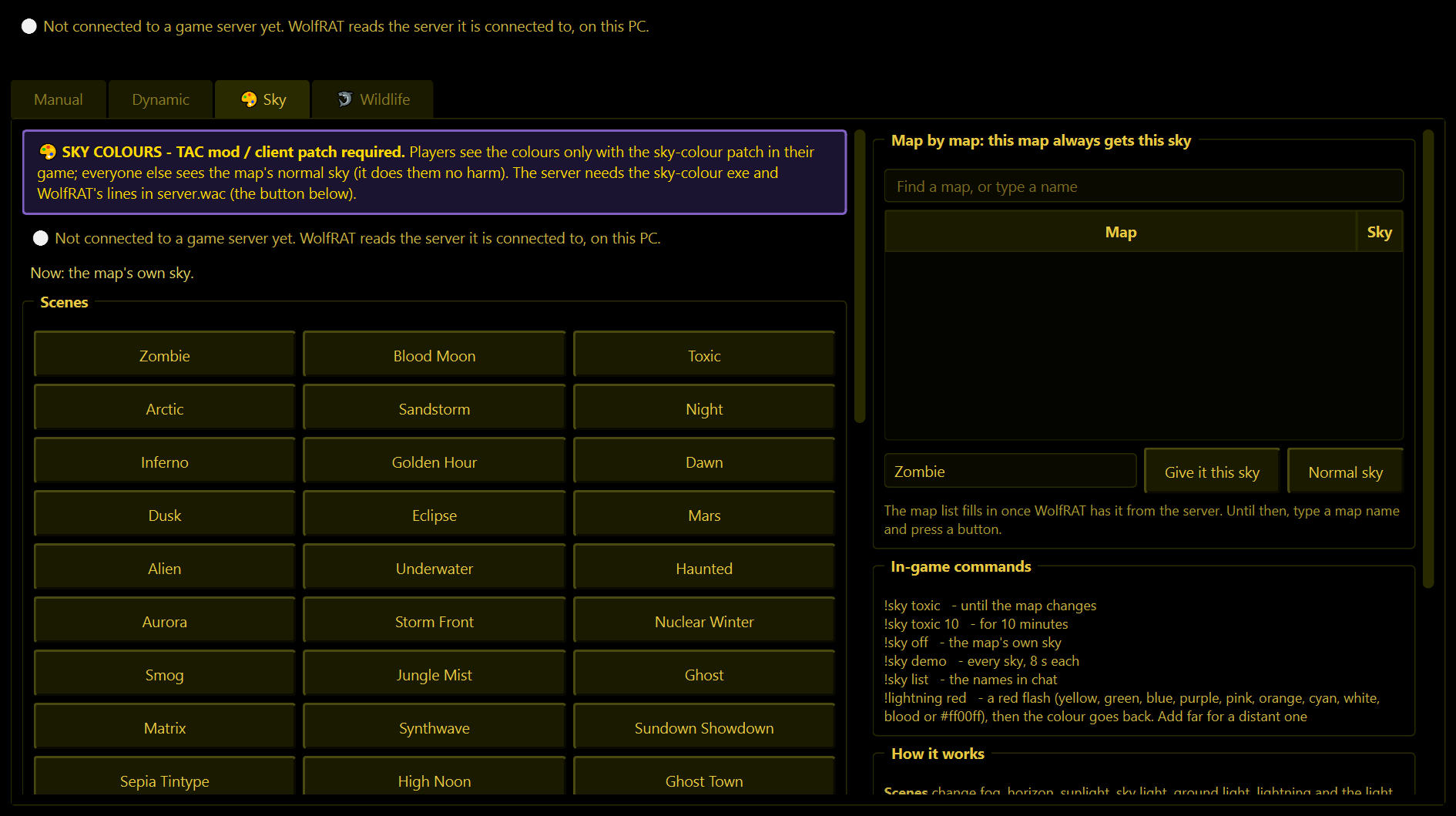
Recolour the whole look of the map, live: the fog, the horizon, the sunlight, the light from the sky, the light on the ground, the lightning and, since 2.9.5, the light inside buildings. Ready-made scenes change them together with a fade.
Needs the sky-colour patch. The server needs the sky-colour exe, and players see the colours only with the sky-colour patch in their game (TAC mod / client patch); everyone else simply sees the map's normal sky, which does them no harm. The page tells you what is missing, and its Install the sky lines in server.wac button adds the lines WolfRAT needs to your server's server.wac. Updated from 2.9.3 or 2.9.4? The page says the lines are from an older WolfRAT: press Update the sky lines in server.wac once, and the indoor colours work from the next map load. Like the weather, it needs WolfRAT on the same PC as the server.
- Scenes - 27 of them: Zombie, Blood Moon, Toxic, Arctic, Sandstorm, Night, Inferno, Golden Hour, Dawn, Dusk, Eclipse, Mars, Alien, Underwater, Haunted, Aurora, Storm Front, Nuclear Winter, Smog, Jungle Mist, Ghost, Matrix, Synthwave and four wild west skies (2.9.5): Sundown Showdown, Sepia Tintype, High Noon and Ghost Town. Click one to show it. Keep it for sets the minutes; "until the map changes" keeps it for the rest of the map.
- ☀️ Map's own sky puts the map's normal sky back.
- ▶ Run the demo shows every scene, 8 seconds each, then goes back to what was showing.
- Make your own - tick what to change and pick its colour (unticked = the map's own colour). 👁 Try it on the server shows it; 💾 Save as a scene keeps it under a name, and mods can then use that name in chat.
- Map by map - give a map a sky it always gets: find the map on the right, pick the scene, press Give it this sky. Normal sky takes it off again.
- Indoors: ceiling and Indoors: floor (2.9.5) colour the light inside buildings - the ceiling light from above, the floor light from below. Zombie has purple rooms; Blood Moon, Toxic, Night, Inferno, Eclipse, Alien, Underwater, Haunted, Aurora, Ghost, Matrix, Synthwave and the western skies colour the rooms too. The natural-looking scenes leave the map's rooms alone.
- Lightning colour only shows when the scene is dark. WolfRAT puts the map's own lightning and room colours back for ☀️ Map's own sky.
- A map change puts the map's own sky back (then a map rule, if it has one, puts its scene on). Players who join later get the sky sent again.
Sky chat options
- Let mods use !sky from chat - off by default. The mod's rank also needs Sky ticked on the Mods tab.
- Tell players in chat when the sky changes.
- Give the map its own sky back with 1 minute left (maps with a timer) - off by default.
| A mod types | What happens |
|---|---|
!sky toxic | That scene until the map changes. Add minutes for less: !sky toxic 10. |
!sky off | The map's own sky. |
!sky demo | Every scene, 8 seconds each. |
!sky list | The scene names in chat. |
Wildlife page - hunting sharks (TAC mod only)
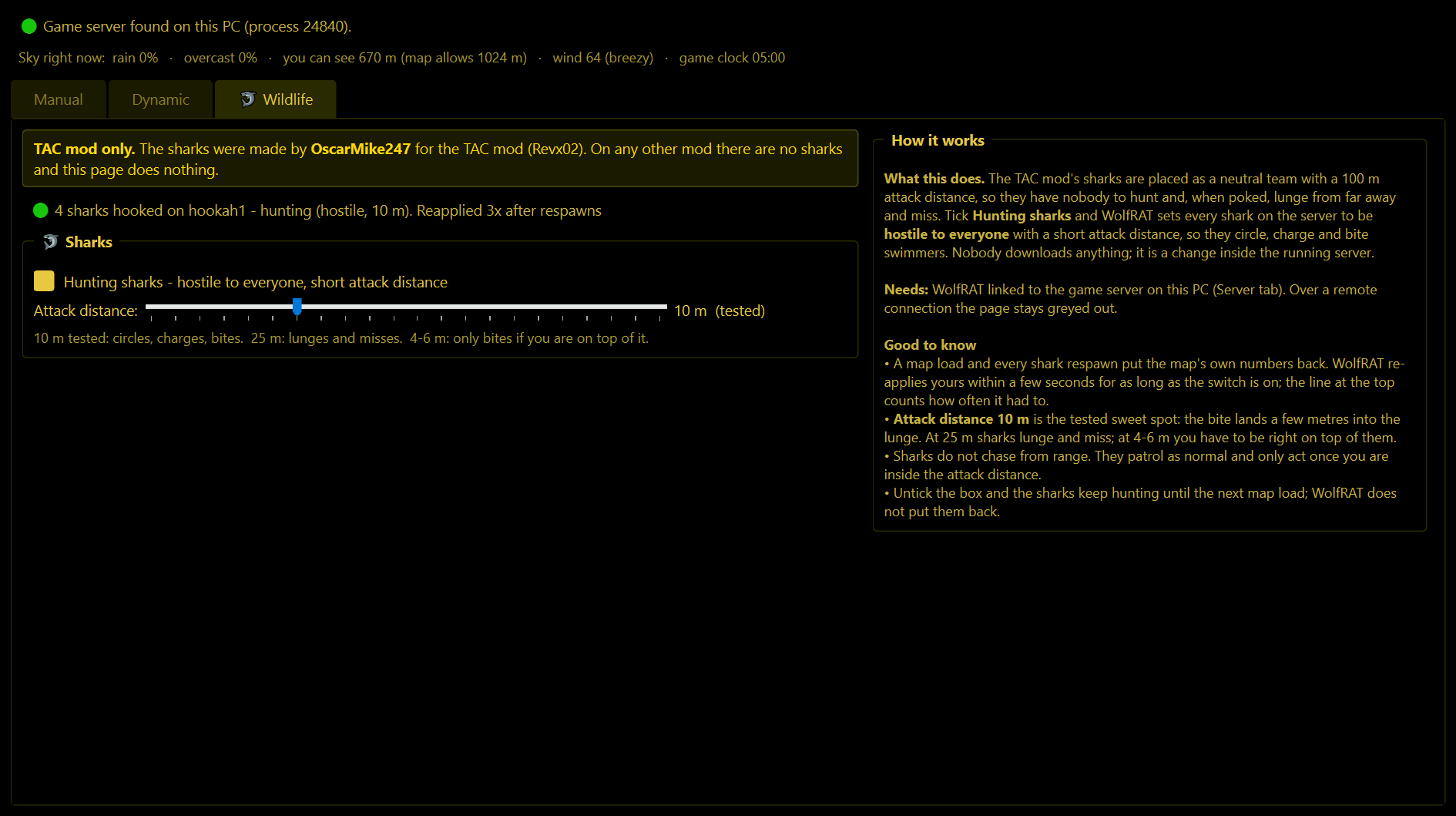
This page is for the TAC mod only. The sharks were made by OscarMike247 for the TAC mod (the Revx02 pack). No other mod has them, so on any other mod the page finds nothing and does nothing.
Out of the box the sharks are placed as a neutral team with a 100 m attack distance, which is why they ignore swimmers until you stab one - and then lunge from far away and miss. Tick Hunting sharks and WolfRAT makes every shark on the server berserk (it attacks anyone, the same as a map maker's Berserk tick) with a short attack distance, so they circle, charge and bite. The sharks keep their own team, so players who join later see them swim normally. It is a change inside the running server: players download nothing, and the map files are untouched.
- Green dot. The line at the top of the page reads "🟢 4 sharks hooked on hookah1 - hunting" when WolfRAT has them. Any other state is spelled out: no server on this PC, no sharks on this map, hunting switched off, or WolfRAT could not write to the server.
- Attack distance. 10 m is the tested sweet spot - the bite lands a few metres into the lunge. At 25 m sharks lunge and miss; at 4 to 6 m you have to be right on top of one.
- Map loads and respawns put the map's own numbers back. WolfRAT re-applies yours within a few seconds for as long as the box is ticked, and the top line counts how often it had to.
- Sharks ignore each other. A berserk creature normally attacks its own kind too, so before the first shark goes berserk WolfRAT adds a small fix to the running server: sharks hunt players, never each other. It stays until the server restarts (a map load keeps it). On a server WolfRAT does not recognise, the sharks are not set to hunt at all, and the top line says so.
- Chasing swimmers from range also needs the shark fix in the server exe: jo-server-patches patch 16. With it, sharks turn and come for you in deep water and never follow you onto land. Without it they patrol and only act once you are inside the attack distance. WolfRAT also gives them a 4 m 'start chasing' distance where the map left none, which the game needs before any chase.
Like the weather, this needs WolfRAT on the same PC as the game server. Untick the box and the sharks keep hunting until the next map load - WolfRAT does not put them back.