🌐 Map Voting tab
Let the players choose the next map. A vote pops up in chat near the end of every match, and the winner is played next.
What players see
A few minutes before the match ends, WolfRAT says in chat:
Map Voting Started! Type !1, !2, !3 to vote.
1: Snake River Ruins
2: Karo Highlands
3: Siaka River
Players type !1, !2 or !3. One vote each - the first one counts. WolfRAT reports how the vote is going along the way, and announces the winner at the end. The winning map is played next - the current match is never interrupted.
- The most votes wins; it does not need a majority. A tie is settled by a coin flip ("Draw! Server coin flip selected...").
- If nobody votes, the first option is quietly queued.
- The vote only starts if there is at least one player on the server. When a vote was waiting for players and someone joins, it waits 40 seconds before starting, so they have loaded in and can see the maps.
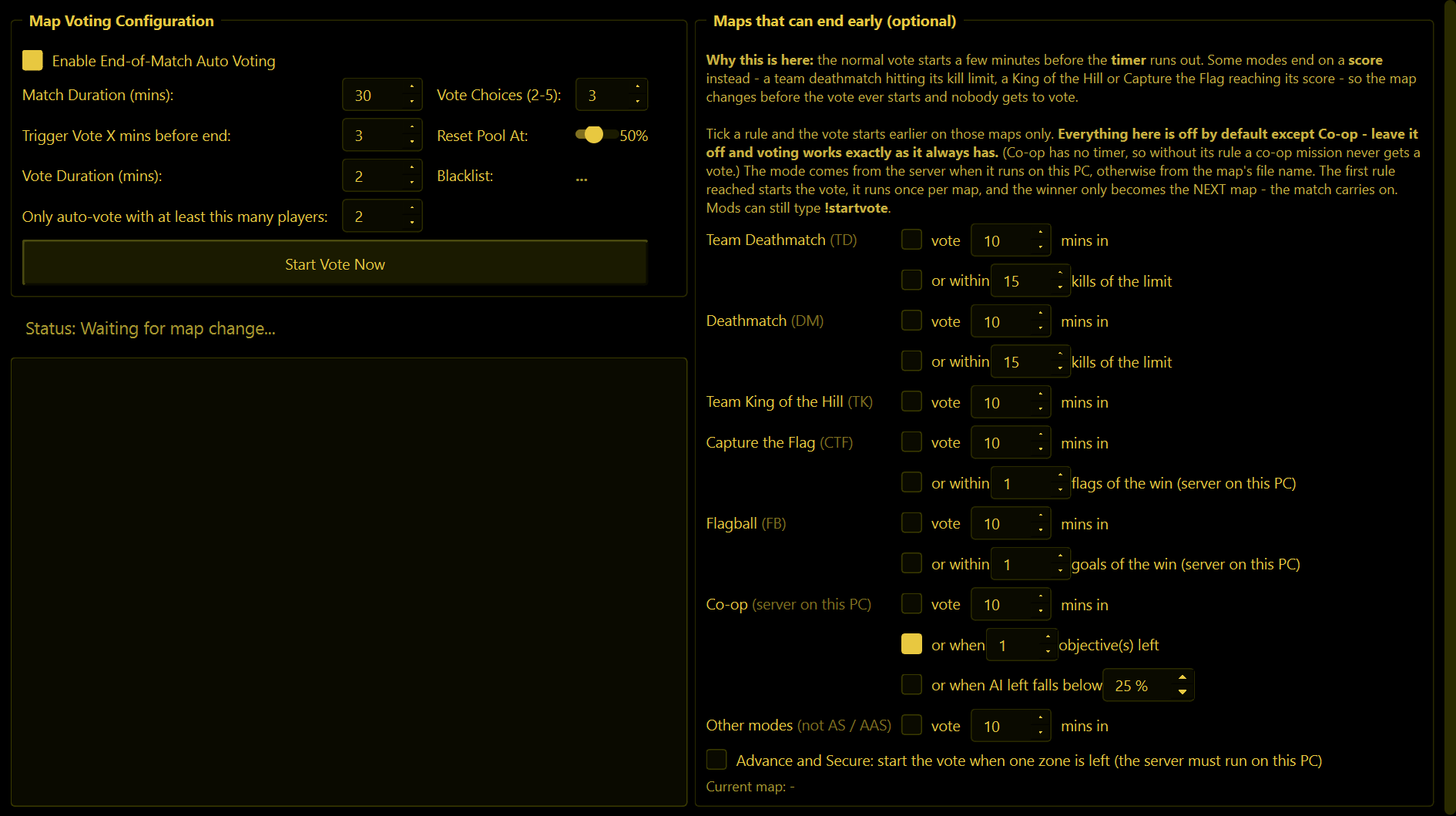
Map Voting Configuration
| Setting | What it does |
|---|---|
| Enable End-of-Match Auto Voting | The automatic vote on or off. On to begin with. |
| Match Duration (mins) | Just for your information - WolfRAT fills this in from the server's own Game Time. |
| Trigger Vote X mins before end | How long before the end of the match the vote starts. 3 minutes to begin with. |
| Vote Duration (mins) | How long players have to vote. 2 minutes to begin with. |
| Vote Choices (2-5) | How many maps are offered. With 5, players vote !1 to !5. |
| Reset Pool At | See "No repeats" below. |
| Only auto-vote with at least this many players | From WolfRAT 2.6.7. The automatic vote waits until this many players are on (2 to begin with), so an empty server is not running votes for nobody. While it waits the Status line says so - "Paused - nobody is on the server. Votes start with 2 or more." - and the log shows one "Auto-vote held" line per map. Set it to 1 for a vote even with a lone player. It counts the players shown on the Players tab; Start Vote Now and a moderator's !startvote ignore it. |
| Start Vote Now | Starts a vote this second, whatever the clock says. |
The Status line tells you what it is doing - for example "12m / 30m remaining. Auto-vote in 9m" or "VOTE ACTIVE! (01:32 remaining)" - and the log underneath records every vote.
No repeats
The maps offered are picked at random from your rotation (Missions tab), leaving out maps that were played recently, so the same favourites do not win every night. Once the list of recently played maps reaches the Reset Pool At percentage of your rotation (50% to begin with), it is wiped and every map is back in the draw. The Blacklist line shows how many maps are currently being left out.
Maps are only marked as "played" when there were actually players on the server, and training maps are never offered.
Maps that can end early (optional)
The normal vote goes by the clock. But some game types end on a score - a team deathmatch reaching its kill limit, for instance - so the map can finish before the vote has even started, and nobody gets a say.
This box fixes that. For each game type you can tick:
- vote N mins in - start the vote that many minutes after the map begins, instead of waiting for the end.
- or within N kills of the limit (Team Deathmatch and Deathmatch only) - start the vote when the leading team or player gets close to the kill limit.
- or within N flags of the win (Capture the Flag) and or within N goals of the win (Flagball) - start the vote when a team is that close to winning (2.8.0). The goals are your MaxScore setting; the flags are the enemy flags on the map.
Whichever you tick, the normal minutes before the end rule still works too - if nobody gets close, the vote starts at the usual time.
Everything here is off to begin with except Co-op - leave it off and voting works exactly as it always has. When WolfRAT runs on the same PC as the server it reads the real game type from the server (2.8.0); otherwise it works it out from the letters at the start of the map's file name (TD, DM, TK, CTF, FB). The flag and goal counts also need the server on the same PC. The vote still only happens once per map, and the winner still only becomes the next map.
A moderator can also type !startvote when they can see a team is about to win.
Advance and Secure: start the vote when one zone is left (2.6.9)
AAS maps end when one team takes every zone, and that rarely lines up with the clock. Tick this box and WolfRAT reads every zone's owner from the running server; the moment the leading team has one zone to go, the vote starts - whatever the timer says. The Status line shows "AAS: 3 zones to go" while it waits. It runs once per map, does nothing on maps without zones, and needs the server on the same PC as WolfRAT (on another machine it is simply ignored and the timer rule carries on as before).
Co-op (2.8.0)
Co-op missions have no round timer, so the normal "minutes before the end" vote never came. Co-op now has its own row, under Flagball:
- vote N mins in - counted from when WolfRAT saw the mission start.
- or when N objective(s) left - on by default, at 1: the vote starts when the players finish the second-last objective. WolfRAT reads the same objectives list players see in game. Missions with only one objective never start it early.
- or when AI left falls below N % - counts the mission's AI that are still alive against how many it started with.
The first one reached starts the vote, once per mission, with your normal vote settings. The "Current map" line shows the progress, for example "Co-op (2 of 5 objectives done, 65% AI left)". All of it needs the server on the same PC as WolfRAT.
Player votes: !vote and !skip
These are separate from the end-of-match vote. They let players ask for a change right now, and you switch them on or off on the Settings tab.
| A player types | What happens |
|---|---|
!vote treasure | Asks the server to switch to a map (part of the name is enough). Everyone else has 60 seconds to type !yes. If enough agree, the server switches to that map straight away. Needs at least 2 players on. |
!skip | Asks to skip the current map. Same 60 seconds and !yes. If it passes, the server moves on to the next map in the rotation. After a successful skip, nobody can start another for 15 minutes. |
"Enough" is the threshold you set on the Settings tab - 51% means more than half of the players who were on when the vote started. The person who starts a vote counts as a yes. WolfRAT gives reminders at 20 and 40 seconds.
All voting is done by WolfRAT, so it only works while WolfRAT is running and connected to the server.