🛡️ Mods tab
Give trusted players the power to look after the server from inside the game. No WolfRAT, no passwords - they just type commands in chat.
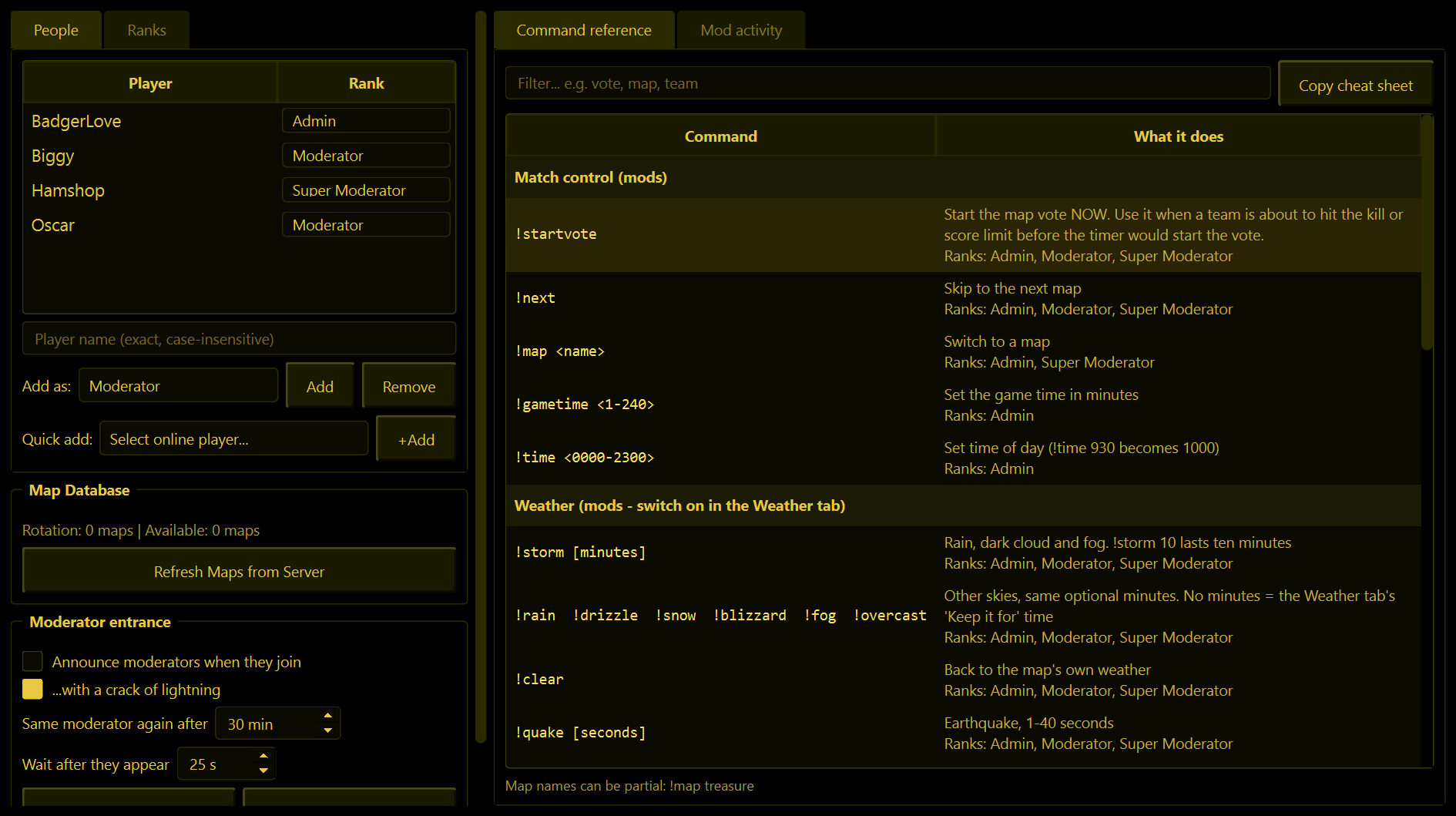
People and ranks
From WolfRAT 2.6.6 not every moderator has to be equally powerful. Everyone you trust gets a rank, and each rank has its own set of chat commands. The top-left of the tab has two pages for this: People and Ranks.
People - who is a mod, and at what rank
- Type a player's name, choose a rank in Add as and press Add - or, easier, pick them from Quick add while they are on the server and press +Add.
- Change someone's rank with the drop-down next to their name. It is saved straight away.
- Remove takes the selected person off the list.
Mods are recognised by their player name, and nothing else. Capitals do not matter, but the rest has to match exactly. That also means anybody who joins using a moderator's exact name gets their powers - so only give ranks to people with names nobody is likely to copy, keep the Admin rank for very few people, and take a name off the list if it is being abused.
Ranks - what each rank may type
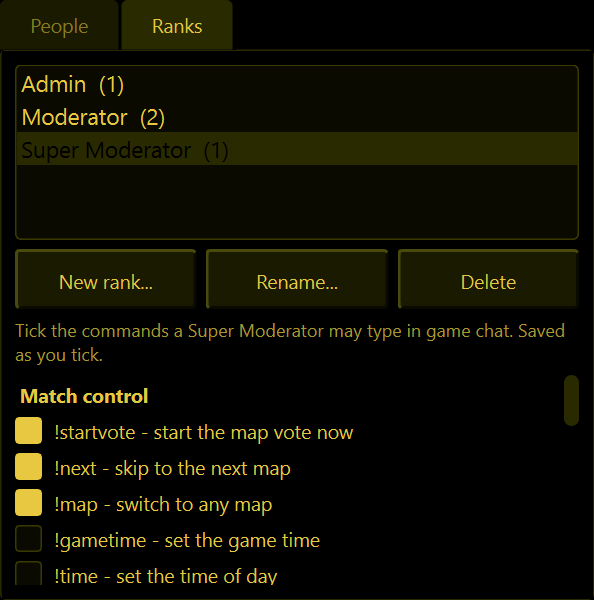
Two ranks are always there:
| Rank | What it can do |
|---|---|
| Admin | Every moderator command, always. Its tick-boxes are greyed out on purpose, so there is always one rank that can do everything. |
| Moderator | Whatever you tick. To begin with: warn, kill, kick, swap, mix and balance teams, start the map vote, skip to the next map, the weather commands and !sky (sky colours, 2.9.3). Not ban, !map, !gametime, !time, !add or !remove. |
You can add as many ranks of your own as you like:
- New rank... - give it a name, for example "Super Moderator" or "Trial Mod". It starts with the same commands as Moderator.
- Click a rank in the list, then tick or untick commands. Changes are saved as you tick. Hover over a tick-box to see exactly which commands it covers.
- Rename... and Delete work on your own ranks only. A rank that still has people in it cannot be deleted - move them to another rank first.
- The number in brackets after each rank is how many people hold it.
Updating from 2.6.5 or older? Everyone who was already on your Mods list becomes a Moderator, so they can no longer ban, force a map, change the game time or time of day, or add and remove maps. To give that back, set the person to Admin on the People page, or tick those commands for Moderator on the Ranks page.
What a moderator can type
The full list, with everything explained, is on the Chat commands page. Which of those commands a person can actually use depends on their rank.
- If a mod types a command their rank does not have, WolfRAT tells them and notes it in Mod activity. From 2.8.2 that is a private whisper (red) - "Your rank is not allowed to use that command." - so the rest of the server does not see it. With the server on another PC, or before WolfRAT is linked, it says "!ban is not allowed for Moderator." in public chat instead.
- If someone who is not on the list types a mod command, nothing happens at all. They are not told off; it is simply ignored.
- The weather commands also need switching on at the Weather tab.
- Web Admin is separate - anyone logged in there can do everything.
The Command reference
The right-hand side of the tab lists every command, and under each moderator command which ranks can use it. Type in Filter... to find one quickly - a rank name works too. Copy cheat sheet copies the whole list, neatly lined up, ready to paste into Discord for your mods and players.
Mod activity
The second page on the right is a running record of who did what: "Oscar kicked Rookie: spawn camping", "Biggy switched to Snake River". It is how you keep an eye on your moderators. Clear Log empties it.
Map Database
Commands like !map treasure work with part of a map's name, and for that WolfRAT needs to know your maps. The line shows how many it knows about. If you have added maps to the server, press Refresh Maps from Server.
Moderator entrance
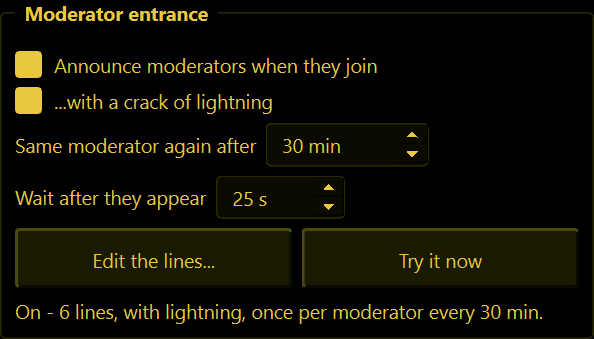
A little thank-you for the people who look after your server. When someone on the People list joins (any rank), WolfRAT announces them to everyone - "Storm warning: BadgerLove has arrived." - with a crack of lightning and thunder.
| Setting | What it does |
|---|---|
| Announce moderators when they join | The whole thing on or off. Off to begin with. |
| ...with a crack of lightning | Adds the lightning and thunder. Needs the lightning add-on; without it the announcement still goes out, just quietly. |
| Same moderator again after | 30 minutes to begin with. A moderator with a shaky connection who drops and rejoins five times gets one entrance, not five. |
| Wait after they appear | 25 seconds to begin with. A player's name appears while they are still on the loading screen - waiting means they get to see and hear their own entrance. |
| Edit the lines... | Write your own announcements, one per row. {player} becomes the name. WolfRAT picks one at random. Lines that need a look are listed under the box (click one to jump to it), and the dark strip shows the line your cursor is on as it will look in game, with the name Badger. With long chat ticked, lines can be 118 characters with colour codes - the Colours... button lists them to copy. A line that is still too long with a long name is replaced by a short "Welcome, name!". |
| Try it now | Fires one off immediately so you can see (and hear) it. |
- Map changes never count as "joining" - nobody is re-announced when the map rolls over.
- Moderators who are already playing when you start WolfRAT are not announced.
- The line under the buttons tells you what it did last, including if the lightning was not ready.